My Process

How I planned, designed, and built this website — including wireframes, accessibility decisions, and references.

This page documents the design and development process behind my portfolio website. It covers the planning phase (wireframes), accessibility compliance, and references for any external assets used. This transparency is part of good design practice.

01 — Planning & Wireframes

Before writing any code, I planned the site structure by sketching low-fidelity wireframes for each of the five pages. The goal was to decide on layout, navigation hierarchy, and content placement before worrying about visual design.

I decided early on to use a consistent fixed navigation bar across all pages so users always know where they are and can navigate freely. The hero section on the home page was designed to communicate who I am in under 5 seconds.
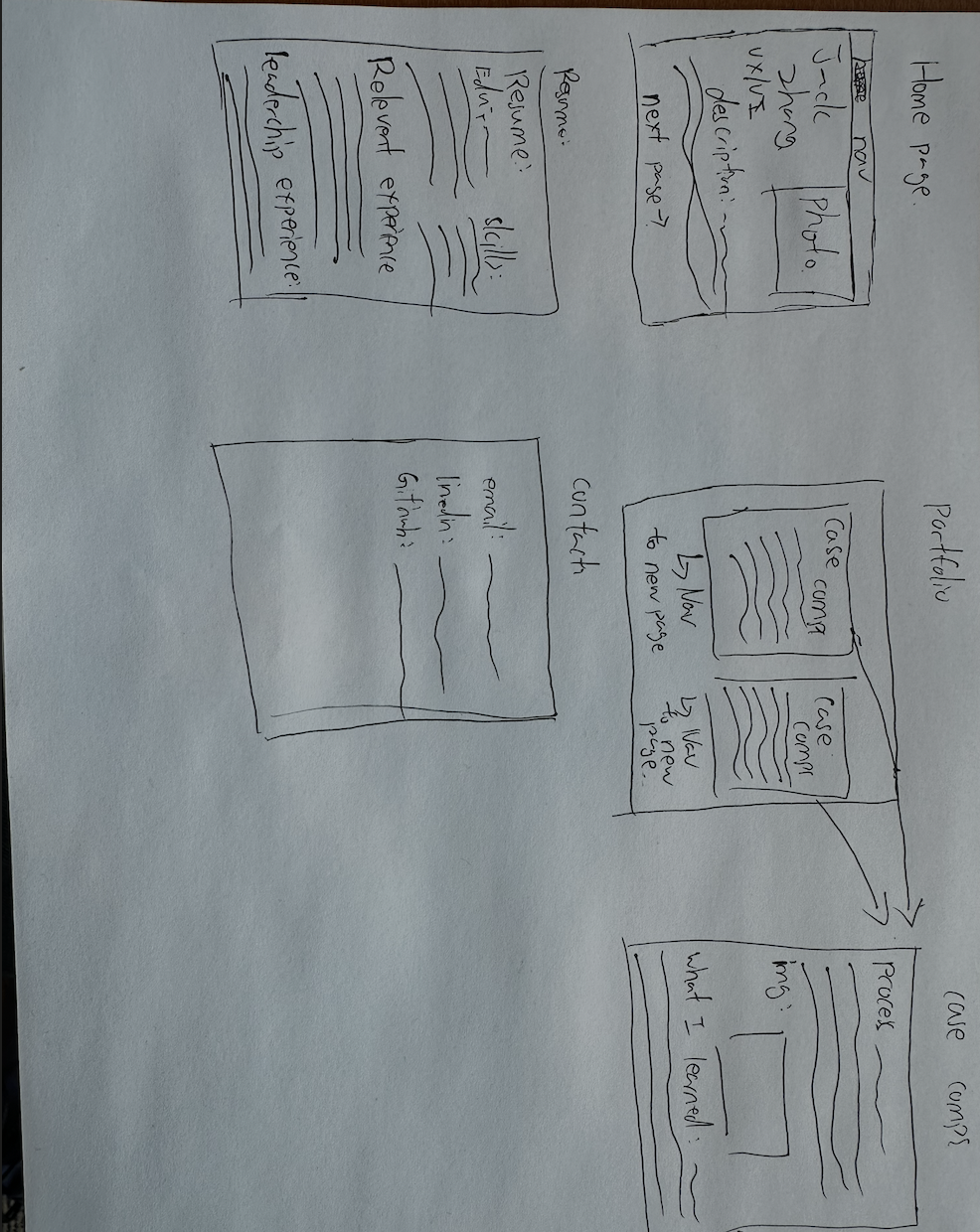
Hand-drawn wireframe sketches for portfolio site layout

02 — Design Decisions

Typography: I chose the Outfit font from Google Fonts because it is modern, highly legible, and has a personality that feels professional without being stiff. It works well at both large headline sizes and small body text sizes.

Colour Palette: The primary colour is a deep navy blue (#1a3fa8 in light mode, #7aaeff in dark mode). I chose blue because it communicates trust and professionalism, which is appropriate for a portfolio targeting employers. All colour combinations were tested for WCAG AAA compliance.

Layout: I used CSS Grid for the portfolio gallery (a 3-column responsive grid that collapses to 2 columns on tablet and 1 column on mobile) and CSS Flexbox for the resume layout (date on the left, details on the right). No HTML tables were used for page layout.

Dark Mode: I implemented a dark mode toggle using JavaScript and CSS custom properties (variables). The user's preference is saved in localStorage so it persists across page visits.

03 — Accessibility (WCAG 2.0 Compliance)

Accessibility was a core requirement, not an afterthought. Below is a list of specific steps I took to ensure the site meets WCAG 2.0 guidelines.

Colour Contrast (WCAG AAA — 7:1 ratio): All text and background colour combinations were tested using a contrast ratio calculator. Main text (#0d1330) on background (#f0f2f8) achieves a ratio of 14.4:1. Muted text (#374151) on background achieves 9.6:1. Both exceed the AAA minimum of 7:1.
Alt Text on Images: Every image on the site has a descriptive alt attribute. Decorative icons use aria-hidden="true" so screen readers skip them. Photo placeholders include instructional alt text.
Semantic HTML: I used proper HTML5 semantic elements throughout: <nav>, <main>, <section>, <footer>, <h1> through <h4>, and <label> elements linked to all form inputs.
Form Accessibility: Every form input on the Contact page has a visible <label> element with a matching "for" attribute. Required fields use aria-required="true". The form uses novalidate and handles validation feedback visually.
Keyboard Navigation: All interactive elements (links, buttons, form inputs) are reachable and usable via keyboard Tab navigation. Focus states are visible through the browser's default outline.
Responsive Design: The site is tested at 375px (mobile) and 1200px+ (desktop). No horizontal scrolling occurs. Text remains readable without zooming on all screen sizes.
Iframe Title: The embedded Google Map iframe includes a title attribute describing its content, making it accessible to screen reader users.

04 — References (APA Format)

The following external resources were used in the development of this website.

Google LLC. (2024). Google Fonts: Outfit. Google Fonts. https://fonts.google.com/specimen/Outfit
Google LLC. (2024). Google Maps Embed API. Google for Developers. https://developers.google.com/maps/documentation/embed/get-started
World Wide Web Consortium (W3C). (2018). Web Content Accessibility Guidelines (WCAG) 2.1. W3C Recommendation. https://www.w3.org/TR/WCAG21/
Mozilla Developer Network. (2024). CSS Grid Layout. MDN Web Docs. https://developer.mozilla.org/en-US/docs/Web/CSS/CSS_Grid_Layout
Mozilla Developer Network. (2024). Using CSS custom properties (variables). MDN Web Docs. https://developer.mozilla.org/en-US/docs/Web/CSS/Using_CSS_custom_properties
WebAIM. (2024). Contrast Checker. WebAIM. https://webaim.org/resources/contrastchecker/